AI apps
Every AI app. One address.
Paste it into the app, sign in, pick projects. No keys to copy, no AI credits to buy.
https://praxis.theorem-labs.com/mcp01
Setup
Where to paste it.
Claude
Web, desktop, mobile
Settings › Connectors › Add custom connector
ChatGPT
Web, desktop, mobile
Settings › Apps & Connectors › Create
Claude Code
Terminal
claude plugin marketplace add Theorem-Labs-LLC/praxis-plugin
claude plugin install praxis@theorem-labs
Codex
Terminal
codex mcp add praxis --url https://praxis.theorem-labs.com/mcp
Cursor
Editor
Add a remote MCP server with the address
VS Code
Copilot agent mode
Add a remote MCP server with the address
Windsurf
Editor
Add a remote MCP server with the address
02
Sign-in
You choose what it can touch.
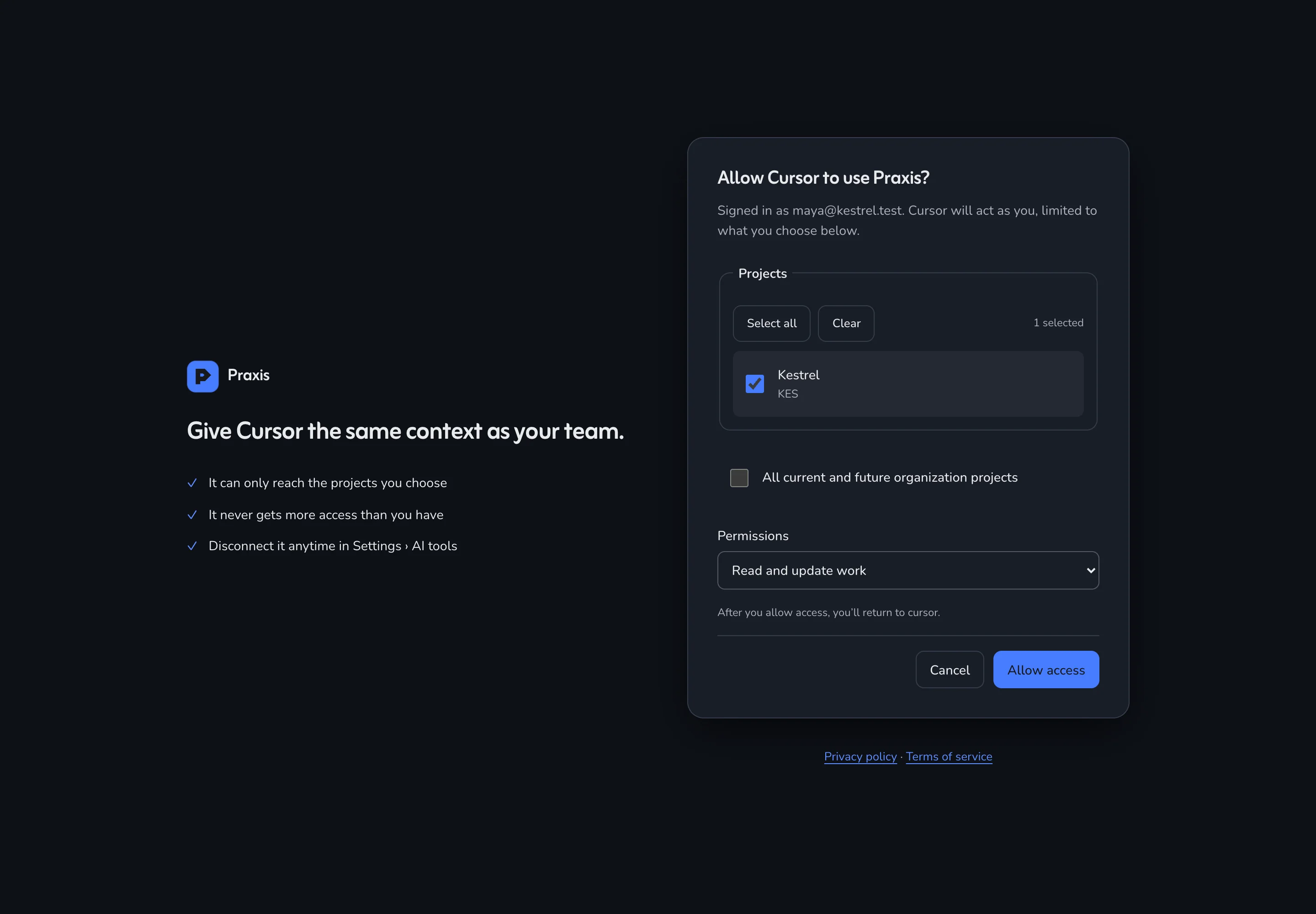
- Pick projects
- The app sees only those.
- Read only
- Or read and update work.
- Your access, no more
- An app never outranks the person.
- Disconnect
- Ends on the next request.
03
The agent loop
How an agent works a board.
- 01
next_taskPicks the top unblocked ticket - 02
claim_issueHolds it, 60-minute lease - 03
get_issueReads links, blockers, PRs - 04
comment_issueLeaves notes for the next one - 05
claim_issueReleases it with an outcome - 06
changes_sinceCatches up on what moved
Two agents asking at once never get the same ticket. Blocked work is never offered.
04
Tools
33 tools. None can delete a ticket.
Tickets
Updates
Notes
Writes · Tickets
next_task
Pick and claim the highest-priority unblocked ticket in one step.
readwrite
An app can
- read the board and search
- create, update and link tickets
- claim the next task and release it
- comment and @mention people
- draft updates and tick notes
An app can never
- delete tickets
- change settings
- invite people or manage members
- mint or reveal keys
05
Bring your own AI
Your AI plan. Our tracker.
- No model inside
- Praxis runs none, and sells no AI credits.
- Use what you pay for
- ChatGPT, Claude, Codex, Cursor or Copilot.
- Agents are free
- You pay for people. Agents never take a seat.
Markdown trackers in the repo
200–250K
KANBAN.md, docs and archives loaded into the first prompt
Praxis over MCP
80–90K
the agent asks for the tickets it needs
First prompt of a session on our own codebase of over a million lines: about 200–250K tokens with Markdown trackers, about 80–90K with Praxis.
06
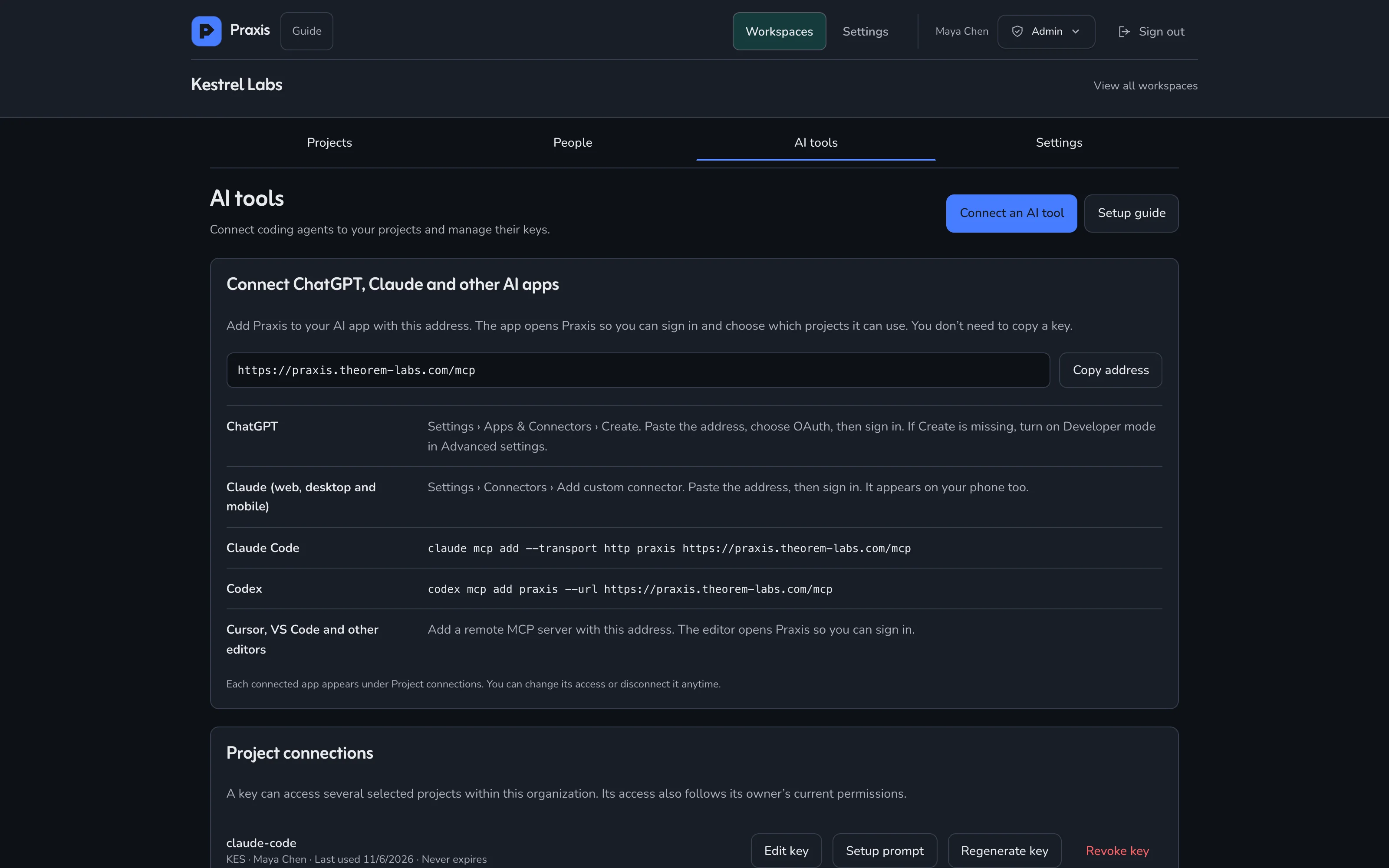
Settings › AI tools
Every connection, in one place.
FAQ
Questions, answered.
Does Praxis include AI, or do we buy credits?
Neither. Praxis runs no model of its own and sells no AI add-on or credits. Your team connects the AI apps it already pays for, such as ChatGPT, Claude, Codex, Cursor or Copilot in VS Code, and they do the work in Praxis over MCP. You pay Praxis for people only.
Do AI agents count as seats?
No. You pay for people. Every AI app you connect works on behalf of the person who connected it, with that person's access, and none of them is billed as a seat.
Which AI apps work with Praxis?
ChatGPT and Claude on web, desktop and mobile, the Claude Code plugin, Codex, Cursor, VS Code and Windsurf, plus any app that supports remote MCP servers. They all use one address and a normal sign-in.
What can a connected app do, and what can't it?
It can read the board, search, create and update tickets, comment, link work, claim the next task, and draft updates and notes. It can never delete tickets, change settings, invite people or manage members.
How do I control what an app sees?
When an app connects you choose the organization, the projects, and read and update or read only. Edit that or press Disconnect in Settings › AI tools at any time; access ends on the next request.
Start
Connect your first app this week.
Sign up free, name your organization and connect your first AI app. Free for up to 2 people, with unlimited agents.